Inspect live browser state
List Chrome tabs, target one explicitly, capture a compact page snapshot, and discover what the current page makes available.
A Chrome extension and local MCP server connect configured coding agents to accessible tabs—so they can inspect live pages, use page-declared tools, operate ordinary interfaces, and verify what happened.
Source and prebuilt GitHub Release artifacts arrive together at the open-source launch. npm and Chrome Web Store distribution follow the early-adopter pilot.
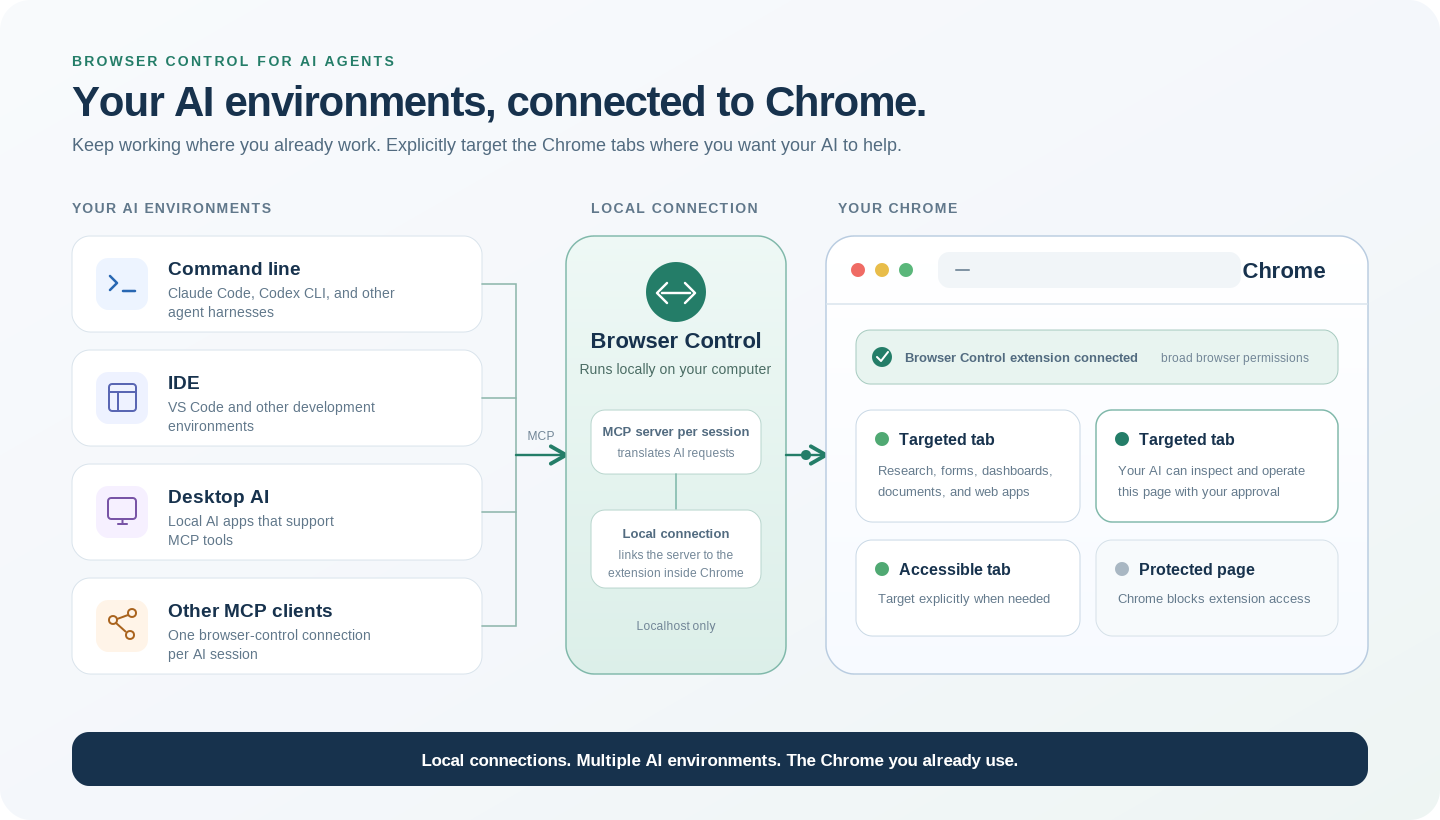
The browser remains where the live application runs. Your coding agent remains where files and development tools live. Browser control connects the two through MCP.
List Chrome tabs, target one explicitly, capture a compact page snapshot, and discover what the current page makes available.
Use an HTTP MCP relay when present, capture current WebMCP registrations, or synthesize bounded tools from ordinary page controls.
A coding agent can read authorized browser material, create or repair local files, reload an exact tab, and verify the observed result.
The bridge exposes browser state before action and returns evidence about outcomes instead of treating an attempted action as success.
Tools can operate on an exact tab ID. Protected Chrome pages are rejected, and focus-sensitive actions can require the tab to already be visible.
Interaction results distinguish attempted, observed, and verified outcomes. Focus changes and value changes are read back where the bridge can verify them.
Page-declared tools keep their native contracts. Pages without registered tools can still expose clearly labeled synthesized actions from visible controls.
When compatible DOM events are insufficient, constrained Chrome input can be used with explicit focus policy and structured verification evidence.
Browser control is powerful software. Its trust boundary is explicit so you can decide where and how to run it.
The extension requests access to browser tabs, page content, scripting, downloads, the debugger API, and bounded clipboard operations. The first release does not include a per-site grant interface.
The extension and MCP server communicate locally. Your configured MCP client may send tool inputs, page content, and results to its model provider under that provider's terms.
Web pages, page-declared tools, relay responses, and synthesized control labels are untrusted and may contain prompt injection or deceptive instructions. Use a separate Chrome profile for sensitive work.
The same extension and server artifact family has been exercised through Claude Code and Codex. The bridge uses the open Model Context Protocol and is not tied to either provider.
Read two authorized course chapters in Chrome, identify their learning objectives, and create notes, an assignment, an instructor guide, and a rubric in a local project folder.
Reproduce a browser-visible defect, edit only the authorized local source file, reload the exact tab, repeat the action, and verify the corrected state.
Claude Code and Codex are third-party clients. Their names indicate tested compatibility, not endorsement or affiliation.
The release candidate has completed technical validation and hands-on owner testing. Publication remains a controlled final step.
Source, documentation, issue tracking, and a prebuilt Release with the extension, server packages, manifest, and checksums.
Matching server packages with provenance will make installation and npx use more convenient after early-adopter stabilization.
The checksummed extension ZIP launches on GitHub first. Store distribution follows the pilot and Chrome Web Store review.